


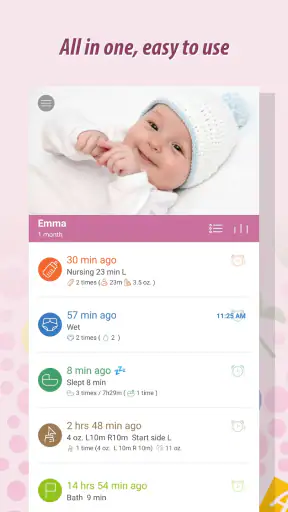
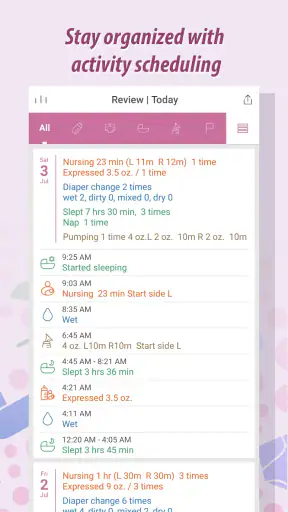
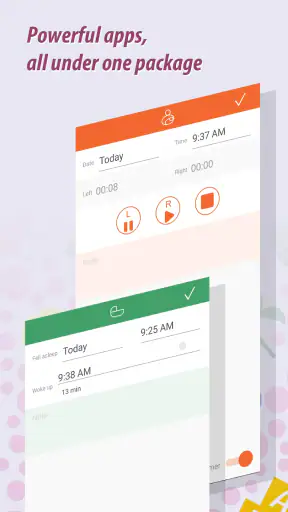
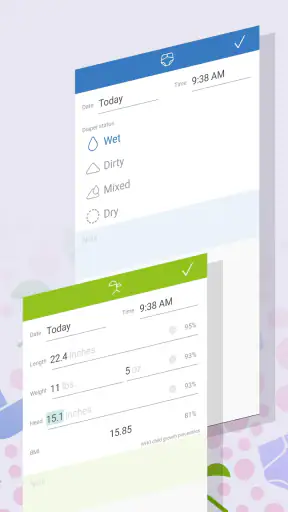
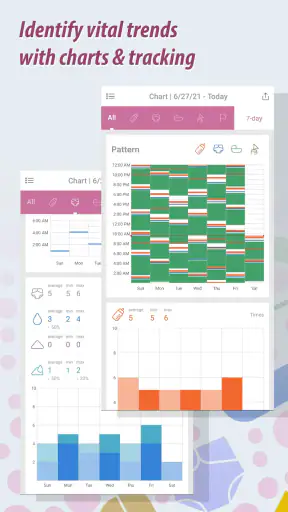
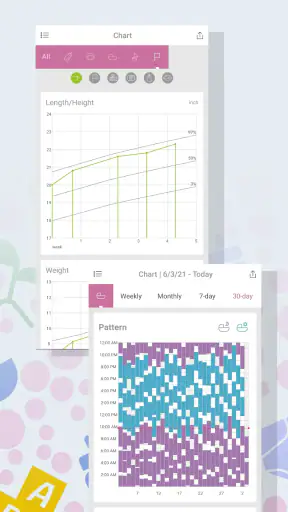
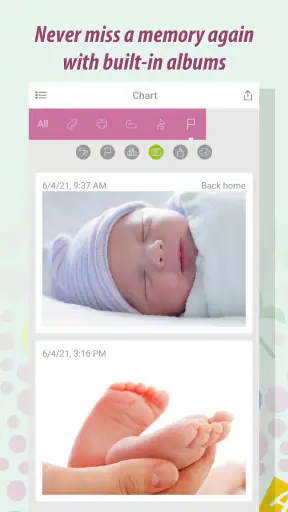
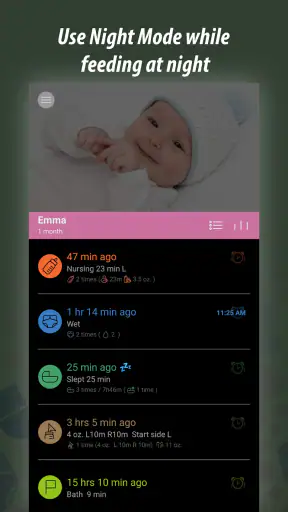
During the first weeks with a newborn, I found that the hardest part was not remembering that something happened, but remembering exactly when it happened and what came next. Baby Tracker - Newborn Log is designed for that very practical problem. It is a free parenting app from NIGHP SOFTWARE that brings feeding, sleep, diaper changes, pumping, and daily routines into one place instead of leaving everything scattered across memory, paper notes, and messages.
I approached it less like a glossy family organizer and more like a tool I would open with one hand while tired, distracted, or holding a baby. That is the right standard for this kind of app. A tracker can have plenty of options and still fail if logging takes too long. In my experience, this one is most useful when treated as a simple record of patterns rather than a source of pressure to create a perfect schedule.
How the app feels when you are tired, busy, or sharing care
Readability and navigation in everyday use
The main strength of this newborn log is its focused purpose. Instead of asking parents to build a general household system, it centers the events that matter most during early childcare: feeding, sleep, diapers, pumping, and routines. That focus makes the app easier to understand than a broad family planner, especially when you only have a few seconds to record something.
I also like the idea of keeping these entries together because newborn care rarely follows a neat timetable. A feeding may happen immediately after a nap, a diaper change may interrupt a planned sleep period, and pumping may need to be recorded separately from the baby’s own feeding. Having those activities in one parenting workspace can make the day easier to reconstruct later.
The app’s audience is broad. It is rated for Everyone, so it is positioned as a family-friendly tool rather than something intended for a narrow professional audience. That matters when several people need to understand the records. A partner, grandparent, or other caregiver should be able to recognize what an entry means without learning a complicated productivity system first.
Its popularity also suggests that the basic concept has connected with many parents: it has passed one million installs, with an average rating of 4.9 from around 71 thousand ratings. I would not treat those numbers as a guarantee that every family will enjoy the interface, but they do indicate that the app has found a substantial audience for this style of newborn logging.
For readability, the most useful habit is to decide before the first busy day which information you genuinely need. If I tried to record every possible detail, the tracker could become another task. If I used it for a few high-value events, it became much easier to scan and discuss. That distinction is important for parents who have limited energy, attention, or time.
Motor and sensory considerations
A baby tracker is often used in awkward physical situations: one hand may be occupied, the phone may be resting on a table, and the user may be moving between rooms. That makes short interactions more valuable than elaborate forms. Baby Tracker - Newborn Log is at its best when I use it as a quick capture tool instead of trying to write a detailed diary after every event.
Parents with reduced dexterity may want to test the logging flow during a calm moment before relying on it overnight. The practical question is not simply whether the app contains the right categories, but whether the controls are comfortable to reach and understand when precision is difficult. A tracker that requires repeated corrections can create frustration, particularly after interrupted sleep.
For users with visual sensitivities, the amount of information shown at once is worth considering. A record containing feeding, sleep, diaper, and pumping details can become visually dense if too many categories are used together. I would keep the routine as consistent as possible and remove unnecessary detail from my own process rather than trying to make every entry comprehensive.
Parents who use screen readers, enlarged text, alternative input methods, or other device-level accessibility settings should try the current version directly with those settings enabled. The app runs on Android seven point zero or later, and the current version is 5.07, but compatibility with an operating system does not automatically tell me how every control behaves with every assistive setup. That is one reason I would test the actions I expect to perform most often before making it the only record of care.
There is also a sensory benefit to reducing mental clutter. When I can put a feeding or sleep event somewhere reliable, I do not have to keep replaying it in my head. That is not a medical feature, and it does not replace observation, but it can reduce the cognitive load of remembering routine events across a long day.
Situational access for families and caregivers
The most convincing use case is a normal, messy day. Imagine a parent feeding the baby before sunrise, changing a diaper while preparing breakfast, and later trying to remember whether the last nap happened before or after a pumping session. A quick log can turn those fragments into a timeline that the parent can review later or explain to another caregiver.
This is particularly useful in households where care is shared in shifts. Rather than asking, “When did the baby last eat?” from memory, a caregiver can check the recent record. The app becomes a shared reference point in the home, although it still depends on everyone entering events consistently. No tracker can correct information that nobody records.
It can also help during transitions between caregivers. A parent leaving the baby with a relative may use the recent entries as a practical handoff: the last feeding, the latest diaper change, the most recent sleep period, and any routine details the caregiver needs to know. I would keep that handoff focused. A long stream of historical entries may be less useful than a clear view of what happened recently.
For parents who pump as well as feed directly, the separate pumping focus is more valuable than a generic notes app. A plain note can record words and times, but it tends to mix important events together. A specialized log gives the information a structure that matches the way newborn care is discussed at home.
The free price makes it easy to try without committing money first. There are in-app purchases priced at $4.99 per item, so I would explore the basic workflow before deciding whether any optional purchase is worthwhile. For a family on a tight budget, the free starting point is helpful; for someone who wants every available function immediately, it is sensible to check what is included before building a detailed routine around it.
Situational access also includes language, stress, and attention. The app is not something I would open for long reflective sessions. Its value comes from short, repeatable actions. That makes it a better match for a parent who wants a practical log than for someone seeking developmental articles, a social community, or a complete family-management platform.
Where the usual alternatives are stronger
The closest alternative is often not another app at all. Many parents begin with a paper notebook, a notes app, a spreadsheet, or a shared chat. Those options are flexible and familiar, and they may be better for someone who wants to write observations in their own words. A notebook can also be easier for a caregiver who dislikes phones or has difficulty navigating small digital controls.
Baby Tracker - Newborn Log has an advantage over a general notes app because its purpose is already shaped around newborn events. I do not need to invent headings for feeding, sleeping, diapers, pumping, and routines. That saves setup time and reduces the chance that an important event gets buried among unrelated notes.
A spreadsheet is stronger when a parent wants custom calculations, unusual columns, or long-term analysis. It can be adapted to nearly any household, but that flexibility comes with maintenance. I would choose the spreadsheet route if I needed a very specific reporting system; I would choose this app if I wanted to begin logging quickly without designing one.
Medical or clinical advice is another matter. A tracker can help me remember what happened, but it should not be treated as a diagnosis tool or as a replacement for professional guidance. If a baby’s feeding, sleep, hydration, or general condition raises concern, I would use the record as supporting information while contacting an appropriate healthcare professional rather than relying on the app’s timeline to interpret the situation.
There is also a trade-off between structure and freedom. The app’s categories make routine recording easier, but a parent with highly individual needs may find a free-form journal more expressive. I would skip this app if my main goal were writing detailed emotional notes, tracking a whole household, or managing appointments and medical documents in the same workspace.
Remaining barriers and practical workarounds
The first barrier is consistency. Newborn life is unpredictable, and even a well-designed log can become burdensome if every event must be entered immediately. My workaround would be to use it for the information I am most likely to forget, then add less important context only when I have the energy. A partial but consistent record is more useful than an ambitious system abandoned after two days.
The second barrier is shared responsibility. If one caregiver logs everything and the others do not, the record may look complete while still missing important events. Before sharing the routine, I would agree on simple conventions: which events everyone records, whether an entry is made immediately or later, and how corrections are handled. This is a household workflow issue, not a missing button that an app can solve by itself.
The third barrier is overinterpretation. Seeing a sequence of times can tempt parents to search for rigid patterns, even though newborn routines change quickly. I would use the history to support conversations and reduce guesswork, not to judge myself when a day does not match yesterday. The app works better as a memory aid than as a strict timetable.
There is also the physical reality of phone use. A parent may be in a dim room, wearing gloves, holding a sleeping baby, or trying not to wake someone. If opening the phone and entering an event feels disruptive, the best solution may be a temporary paper note followed by later entry. That is less elegant, but it protects the routine from becoming a source of stress.
Finally, some users may need more explicit accessibility support than a general parenting app can provide. People with motor, visual, cognitive, or sensory needs should judge the actual interaction on their own device, including text scaling and assistive settings. I appreciate the focused design, but I would not assume that a family-friendly age rating means the experience is equally comfortable for every ability or context.
My inclusive verdict for new parents
I see Baby Tracker - Newborn Log as a practical companion for parents who want a dedicated place to record the small events that blur together during the newborn stage. Its strongest qualities are its narrow focus, its useful separation of care activities, and the way it can support handoffs between caregivers. The free entry point makes experimentation easy, while the optional in-app purchases mean I would still review the available choices before paying.
The app is especially suitable for a parent who wants quick records of feeding, sleep, diapers, pumping, and routines without building a custom system. It is also a good fit for families where more than one person needs a common reference. I would recommend trying it during a calm part of the day, setting up only the categories that matter, and checking whether the controls remain comfortable with the phone settings and input methods you normally use.
I would choose a notebook or general notes tool instead if free-form writing, offline simplicity, or custom organization mattered more than specialized categories. I would look for a different kind of product if I needed medical management, detailed analytics, broad family scheduling, or a social support community. This app does not need to do all of those things to be useful; it just needs to make newborn logging easier.
Overall, I find the best value in using it modestly. Record the events that answer real questions, use the history to make caregiver conversations clearer, and avoid turning every irregular day into a problem to solve. For that purpose, Baby Tracker - Newborn Log is a sensible parenting app from NIGHP SOFTWARE, and its strong reception—around five thousand written reviews alongside its high average—matches my impression that the focused approach works for many families.
If you are comfortable using a phone during busy care moments and want more structure than a blank notes page, I would give it a fair trial. If the interface creates extra effort for your hands, eyes, attention, or household routine, switching to a simpler method is not a failure. The right tracker is the one your family can use reliably, and this app is most convincing when it quietly supports that reliability rather than demanding more work from already tired parents.


